
Recreate Any Movie Scene With Your Own Characters Using Higgsfield Genjutsu
Turn trending movie scenes and viral videos into your own AI-generated creations. Using Higgsfield Genjutsu, you can recreate a scene with your own characters while preserving the original video's motion, choreography, and camera movement. In this step-by-step workflow, you'll learn how to set up your tools, create consistent character sheets, choose a reference video, and generate your own cinematic recreation.
Set Up Your Higgsfield Account
The first step is creating an account on Higgsfield, the AI creative platform that includes Genjutsu for motion transfer and character replacement.
Create an email account
If you need a new email address, you can start with Proton Mail. Its free plan may be sufficient for basic email verification; you don't need to purchase a paid plan just to create a standard account.
- Open Proton Mail.
- Select the free plan during registration.
- Complete the registration process and verify your email address.
- If Proton requests a recovery email, you can provide an existing address if you are comfortable doing so.
Important: A free Proton Mail address is not necessarily a business or organization email address. Higgsfield's account eligibility and free-generation policies may change, so a new email address does not guarantee access to a free generation.
Register on Higgsfield
- Visit higgsfield.ai.
- Select Sign Up.
- Enter your email address and complete the verification process.
- Answer any onboarding questions.
- Open your account and check the available credits and generation options.
If verification fails, check your spam folder and make sure the email address is valid. A VPN server in the US or Europe may be useful for connectivity or privacy when appropriate, but it does not guarantee eligibility or bypass account restrictions.
Create Your Character Sheet
A consistent character reference is one of the most important elements of this workflow.
Instead of relying on a text description alone, create a character sheet that shows your character from multiple angles. This gives the video model a clearer visual reference for facial features, hairstyle, body proportions, clothing, and accessories.
Where to create it
- Open Higgsfield.
- Navigate to Images.
- Choose an available image-generation model.
- Upload your character reference image.
- Copy and paste the prompt below.
- Generate and review the result.
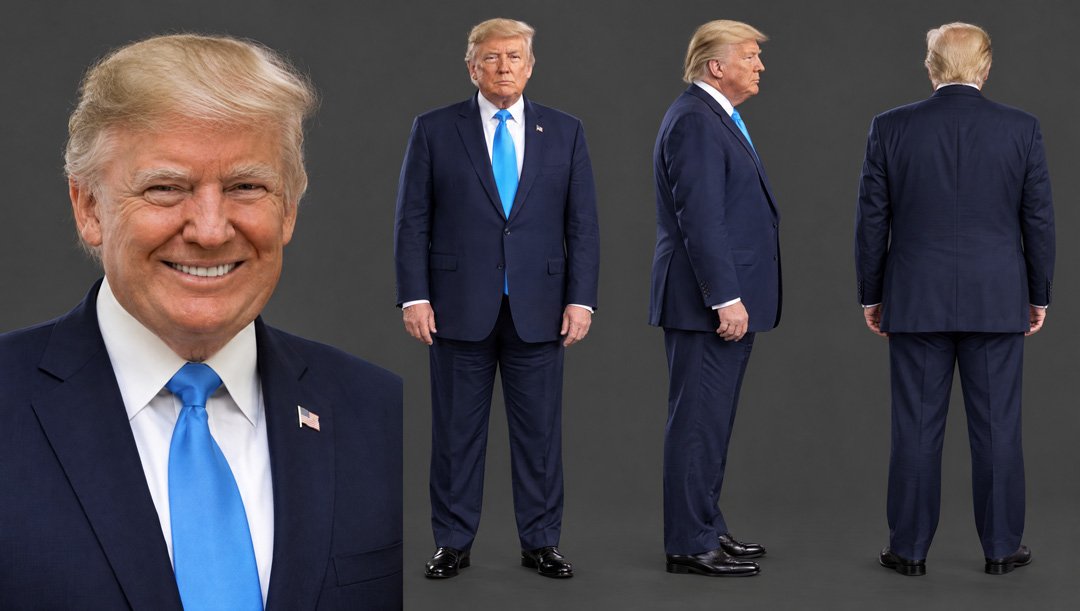
Create a professional character reference sheet based strictly on the provided reference image.
Preserve the character's exact identity, facial features, hairstyle, body proportions, clothing, accessories, materials, colors, textures, and overall visual design from the reference image. Do not redesign, reinterpret, simplify, or add new elements.
Present the character as a clean multi-view character sheet with exactly four views:
1. A large close-up portrait showing the character's face from the front, clearly displaying facial features and identity.
2. A full-body front view, standing naturally and facing directly toward the camera.
3. A full-body side profile view, showing the character's exact silhouette and proportions from the side.
4. A full-body back view, facing completely away from the camera and clearly showing the back of the character.
Keep the character completely consistent across all four views. The face, hairstyle, body proportions, clothing, accessories, and design details must remain identical between views.
Use a neutral studio presentation with a clean, seamless, solid dark-gray background. Soft, even studio lighting. No environment, no scenery, no props, no text, no labels, no borders, no decorative elements.
Arrange all four views neatly in a single horizontal character-sheet composition, with consistent scale, spacing, camera height, lighting, and perspective.
The result should look like a professional character design / production reference sheet, highly detailed, clean, realistic, and suitable as a master visual reference for generating the same character in future images and videos.
height 181 CM
weight 82 KG
Avoid reference images with obstructed faces or heavily obscured clothing.
Check that the generated character looks consistent across all four views.
Save the final character sheet so you can reuse it in future workflows.
Choose a Trending Reference Video
Now you need a video containing the scene, action, or choreography you want to recreate.
You can use a trending video from social media, a movie scene, or a suitable clip from another source.
Look for a reference that has:
- Clear, recognizable movements.
- A visible subject and readable body poses.
- Camera movements that you want to reproduce.
- A short duration that suits your intended output.
- A composition that works for your target platform, such as Instagram Reels or TikTok.
Want to recreate the exact example shown in this workflow? Use the reference video provided on this page, where available.
The reference video supplies the motion and visual sequence. Your character sheet supplies the identity of the character you want to introduce.
Open Higgsfield Genjutsu
Higgsfield Genjutsu is designed to transfer motion and recreate video concepts using your own characters, locations, or other visual elements.
- Visit Higgsfield.
- Open Video from the navigation menu.
- Select Genjutsu.
- Explore the available presets or community examples.
- Find a suitable video and select Recreate, if that option is available.
- Choose or upload your character reference when prompted.
You can also access Genjutsu directly through the Higgsfield Genjutsu page.
The exact interface and available controls may vary as Higgsfield updates its platform.
Apply the Video Recreation Prompt
Once you have selected a reference and prepared your character sheet, configure the generation using the available reference and character inputs.
Copy the following prompt into the generation interface if a prompt field is available.
Use the original source video @[Video 1](video_1) as the absolute reference for all elements, including camera movement, framing, choreography, body movement, timing, performer positions, lighting, editing, and total playback duration.

Replace ONLY the performers described below.

Background: Azadi Tower, Iran

CHARACTER ASSIGNMENT

@[Image 1](image_1) = One central / lead performer
@[Image 2](image_2) = All other dancers

Track each performer based on their identity and role in the original source video, not on their temporary position on screen.

1. CENTRAL / LEAD PERFORMER → @[Image 1](image_1)

Identify exactly one central / lead performer and completely replace that performer from head to toe with the character shown in @[Image 1](image_1).

Match the complete appearance of Image 1, including:
- Face and identity
- Hairstyle
- Body type
- Full outfit
- Shoes
- Accessories
- Overall silhouette

Do NOT preserve the original lead performer’s clothing.
Do NOT perform a simple face swap.

Use the original performer ONLY as a reference for:
- Pose
- Choreography
- Movement
- Position
- Scale
- Timing

There must be ONLY ONE @[Image 1](image_1) character throughout the entire video.

2. ALL OTHER DANCERS → @[Image 2](image_2)

Completely replace every other dancer from head to toe with the character design specified in @[Image 2](image_2).

Every @[Image 2](image_2) dancer must match the overall design language of Image 2 exactly.

Completely remove every dancer’s original clothing and original clothing silhouette.
Do NOT simply change the original clothing color.
Do NOT preserve the original costume’s shape, structure, geometry, or silhouette, including:
- Jackets
- Shirts
- Pants
- Shoes
- Costumes

The final silhouette must look like the actual character design shown in @[Image 2](image_2), including the face-screen smile and full humanoid robot appearance.

Each original dancer must be used ONLY as a reference for:
- Pose
- Skeletal movement
- Choreography
- Position
- Direction
- Scale
- Spacing
- Timing

The complete visual appearance of every background dancer must be determined by @[Image 2](image_2).

CHARACTER CONSISTENCY

Once a character has been assigned, maintain that character consistently throughout the entire video.

@[Image 1](image_1) = Always the exact same single central / lead performer
@[Image 2](image_2) = Always all remaining dancers

During:
- Fast dance movements
- Spins and rotations
- Motion blur
- Body overlaps
- Partial occlusion
- Full occlusion

the original performer’s identity, clothing, or appearance must NEVER reappear.

Dance movements may change only the character’s:
- Pose
- Body movement

They must NEVER change the character’s visual appearance or identity.

If a dancer disappears behind another person or object and later reappears, the dancer must return as the exact same assigned character, maintaining the same:
- Hairstyle
- Costume / design
- Shoes or lower-body form
- Body proportions
- Face appearance
- Overall visual identity

OBJECT REPLACEMENT

If a cigarette appears in the original source video, replace it with a thick brown cigar.

Preserve the original:
- Mouth position
- Cigar thickness and placement
- Movement
- Timing

Maintain all related visual behavior consistently with the original source video, including:
- Smoke
- Burning ember
- Ash
- Tobacco appearance

The cigarette itself must always be replaced with a thick brown cigar.

SOURCE VIDEO LOCK

Preserve the following elements from the original source video EXACTLY:
- Camera movement
- Camera framing
- Lens perspective
- Choreography
- Body movements
- Performer positions
- Performer spacing
- Timing
- Editing
- Background environment
- Lighting
- Total playback duration

Do NOT change:
- Choreography
- Location
- Number of dancers
- Camera setup
- Scene composition

FINAL PRIORITY ORDER

Preserve the original source video’s camera movement, body movement, choreography, timing, framing, editing, environment, and total duration exactly.

The single central / lead performer must be completely transformed into the @[Image 1](image_1) character, including the full outfit and complete overall appearance.

Every other dancer must be completely transformed into the @[Image 2](image_2) character design.

The original performers provide movement information only. Their visual appearance must come entirely from the assigned reference images.

Background should be Azadi Tower, Iran.

Never simply recolor the original performers’ costumes. The original clothing, costume geometry, silhouette, face, or identity must never reappear.

Maintain strict visual consistency and identity consistency for @[Image 1](image_1) and @[Image 2](image_2) throughout the entire performance.

Output size: 9:16
Generate and Review Your Video
Once everything is configured, start the generation process.
Generation time depends on the selected model, video complexity, and current platform availability. Wait for the result to finish processing.
When your video is ready, review it carefully.
If the result is not satisfactory, adjust the reference image, character sheet, or prompt and try again if your account has generation credits available.
What if free generation is unavailable?
Higgsfield's free credits, signup offers, and generation limits can change. If your account has no free generation available, check the current plan and credit options before proceeding. Creating additional accounts may be restricted by the platform's terms and eligibility policies.
- Character identity: Does the character resemble your character sheet?
- Facial consistency: Does the face remain stable throughout the video?
- Movement: Does the action follow the reference?
- Clothing: Are the outfit and accessories consistent?
- Anatomy: Are hands, limbs, and body proportions realistic?
- Camera: Does the camera movement resemble the original?
- Visual quality: Are there noticeable distortions, flickering, or unwanted artifacts?
Recreate Any Movie Scene With Your Own Characters Using Higgsfield Genjutsu
You now have the foundation for recreating movie scenes and viral videos with your own AI-generated characters. The key is combining three elements: A carefully selected reference video. A consistent, high-quality character sheet. A well-defined recreation prompt. Once you understand this process, you can adapt the same approach to different characters, scenes, and visual concepts.